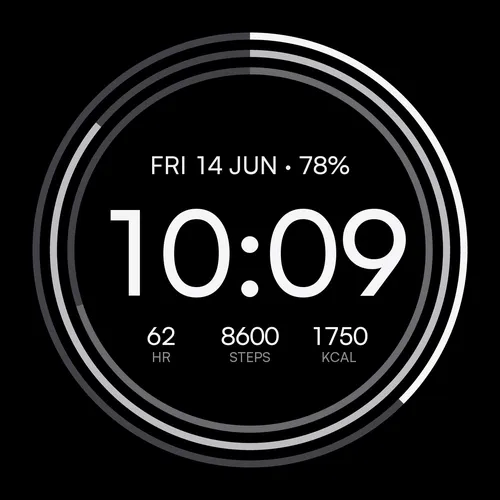
The idea
Most watch faces try to show everything. Tessera starts from the opposite end: a big, quiet time set in a typeface we drew for it, and only the data you choose underneath. It shipped in 2026, passed ten thousand installs, and holds a 4.5-star rating on the Connect IQ Store (25 reviews as of September 2026). It is the face we point people to first, because it is free and because it shows how we work.
Three modes, one face
Tessera has three modes, picked in settings or right on the watch:
- Pure shows time and date only. Clean and quiet, nothing to distract you.
- Daily adds three data fields under the time: steps, heart rate, battery, or any of the 20 stats below.
- Goals keeps the same data and binds it to progress arcs around the face, so one glance tells you how close you are to your targets.
Goals that need no setup
In Goals mode every goal starts at 0, which simply means automatic: the arcs follow the goals from your Garmin profile and work immediately. Want your own target, say 12,000 steps instead of the default? Type the number into that slot's goal field and the arc recalibrates. Arcs attach to stats that accumulate over the day; momentary readings like heart rate display as plain numbers, marked "(no arc)" in the settings list.
The 20 stats
Each of the three slots takes any of these, or Empty:
| Group | Stats |
|---|---|
| Activity | Steps, distance, floors climbed, calories, active calories, move bar |
| Health | Heart rate, stress, Body Battery, Pulse Ox, VO2 Max |
| Outside | Temperature, sunrise, sunset, altitude, pressure |
| Utility | Battery in days, notifications, ISO week number, second time zone |
Color
Six palettes: Mono, Ember, Forest, Tide, Plum and Solar. Muted, wearable tones rather than neon, chosen to read correctly on both display types. One deliberate rule: the same palette looks the same on an AMOLED Venu and a MIP Fenix, because we tuned each color for the 64-color MIP grid before letting it ship.
Every setting, explained
Settings live in the Connect IQ app on your phone: your device, then Watch Faces, then Tessera, then Settings. Ten entries, all translated into 24 languages.
| Setting | Options | What it does |
|---|---|---|
| Mode | Pure / Daily / Goals | The three faces described above. |
| Seconds | Off / On wrist raise / Always | On wrist raise (the default) shows live seconds for a few moments after you look, then lets the display rest. |
| Time format | Auto / 12h / 24h | Auto follows the watch system setting. |
| Palette | Mono / Ember / Forest / Tide / Plum / Solar | The arc and accent color scheme. |
| Background | Dark / Light | Applies on MIP displays. AMOLED watches always run dark (burn-in and battery rules). |
| Stat size | S / M | The size of the three data fields. |
| Slot 1, 2, 3 | 20 stats + Empty | What each field shows, left to right. |
| Goal 1, 2, 3 | 0 = automatic, or your number | The target behind each slot's arc in Goals mode. |
On the watch vs on the phone
On watches with Garmin's on-device editor (Fenix 8 and E, Venu 3 and 4, Vivoactive 5 and 6, Forerunner 570 and 970, Enduro 3, Instinct 3 AMOLED and other recent models), hold the watch face and choose Customize to switch the mode and the palette without reaching for the phone. Slot and goal choices are set in the Connect IQ app on all watches.
Works on
Tessera reaches further back than most modern faces: 83 models, including watches from 2018.
| Family | Models |
|---|---|
| Fenix | Fenix 8 (43, 47, Solar 47, Solar 51), Fenix 8 Pro, Fenix E, Fenix 7 series (7S, 7, 7X, Pro), Fenix 6 series (6S, 6, 6X, Pro), Fenix 5 Plus series (5S, 5, 5X) |
| Forerunner | 165, 245, 255 (and 255S), 265 (and 265S), 570, 745, 945, 945 LTE, 955, 965, 970 |
| Venu / Vivoactive | Venu, Venu 2 (2S, 2 Plus), Venu 3 (3S), Venu 4 (41, 45), Vivoactive 4 (4S), 5, 6 |
| Epix / Enduro | Epix Gen 2 (42, 47, 51, Pro), Enduro, Enduro 3 |
| Instinct | Instinct 3 AMOLED (45, 50), Instinct Crossover AMOLED |
| Specialty | MARQ Gen 1 (all eight) and Gen 2, Approach S50 and S70, Descent G2, Mk2 (Mk2S), Mk3, D2 Air X10, D2 Mach 1 and Mach 2 |
The honest fine print
Tessera keeps its one color scheme across displays, which means AMOLED owners do not get a light mode (see the FAQ for why). The date renders in 24 Latin-alphabet languages and falls back to English elsewhere. And the type runs small on some wrists at the S size; that is the most common request in our reviews, we hear it, and a larger option is coming in an update. If something else is missing, tell us at contact@getwatchfaces.com. Requests from reviews and emails genuinely shape the updates.