The idea
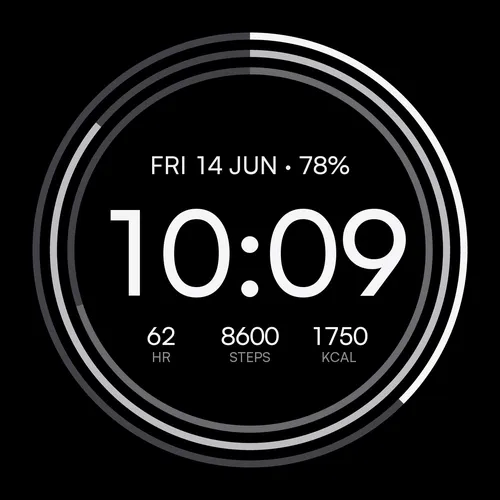
Tessera works because it is simple, and people told us so. Tessera+ keeps that intact and answers the three things reviewers asked for most: make the data bigger, let me use icons, and give me more color. It is the same calm face with a custom typeface and a big, quiet time, built on the same foundation, tested across the same 83 watches. The difference is how much of it you can shape.
What Tessera+ adds
| Tessera (free) | Tessera+ | |
|---|---|---|
| Stat size | S / M | S / M / L (labels grow with values on AMOLED) |
| Stat labels | Text | Text or icons |
| Palettes | 6 | 30 in three families |
| On-watch color | Palette only | Palette or any color (full picker) |
| MIP arcs | Standard | Retuned contrast and spacing |
| Weekly view | — | Recap line + weekly goals rings |
| Modes, stats, arcs, languages | Same: 3 modes, 20 stats, automatic goal arcs, 24 languages | |
Bigger stats, your call
The single most common note on Tessera was that the data ran small on some wrists. Tessera+ adds an L size above S and M. On AMOLED the labels scale with the values so the whole row grows together; on MIP the labels stay compact, because scaled labels crowd the arcs on transflective screens. You pick the size; the face keeps its spacing.
Text or icons
Every stat can show its name as text (STEPS, HR, KCAL) or as a small icon in the same quiet ink as the rest of the face. It is a switch, not a replacement: choose whichever reads faster for you. All twenty stats have an icon, so a full data layout stays consistent whichever you prefer.
Thirty palettes, or any color
Tessera+ ships three palette families of ten: Core (the wearable classics), Pastel (soft, quiet tones) and Noir (deep jewel tones). Each is tuned to read the same on an AMOLED Venu and a MIP Fenix. And on watches with Garmin’s on-device editor you are not limited to the presets at all: open the color picker on the watch, choose any shade, and the face derives its three-ring accent ramp from it.
Your week on the wrist
Tessera+ can also look past today. Weekly Recap draws a quiet line under the time for how your week is going so far, with the running total below it (steps this week, for example). Weekly Goals swaps the daily stats for weekly ones, run, ride and intensity minutes, each with its own ring. It is the same calm layout, measuring a week instead of a day.
Every setting, explained
Settings live in the Connect IQ app on your phone: your device, then Watch Faces, then Tessera+, then Settings. All translated into 24 languages.
| Setting | Options | What it does |
|---|---|---|
| Mode | Pure / Daily / Goals | Time only, time plus three stats, or the same stats bound to progress arcs. |
| Stat size | S / M / L | The size of the data fields. L is the new large step. |
| Labels | Text / Icons | Show each stat’s name as a word or as an icon. |
| Palette | 30 across Core / Pastel / Noir | The arc and accent color scheme. |
| Custom color | Any hex, or the on-watch picker | Overrides the palette with a color you choose; the ramp is derived automatically. |
| Seconds | Off / On wrist raise / Always | On wrist raise shows live seconds briefly after you look, then rests. |
| Time format | Auto / 12h / 24h | Auto follows the watch system setting. |
| Background | Dark / Light | Applies on MIP. AMOLED always runs dark (burn-in and battery rules). |
| Slot 1, 2, 3 | 20 stats + Empty | What each field shows, left to right. |
| Goal 1, 2, 3 | 0 = automatic, or your number | The target behind each slot’s arc in Goals mode. |
Works on
The same broad reach as the free Tessera: 83 models, from watches released in 2018 up to the latest. If your Garmin runs Connect IQ 3.3 or newer, Tessera+ almost certainly supports it, on both AMOLED and MIP displays.
The honest fine print
Tessera+ is paid; the free Tessera stays free and is the right choice if its six palettes and two sizes already suit you. As with all our faces, AMOLED watches run dark by design (no light mode), and the date renders in 24 Latin-alphabet languages with an English fallback elsewhere. Questions before buying? Email contact@getwatchfaces.com; we answer.