The idea
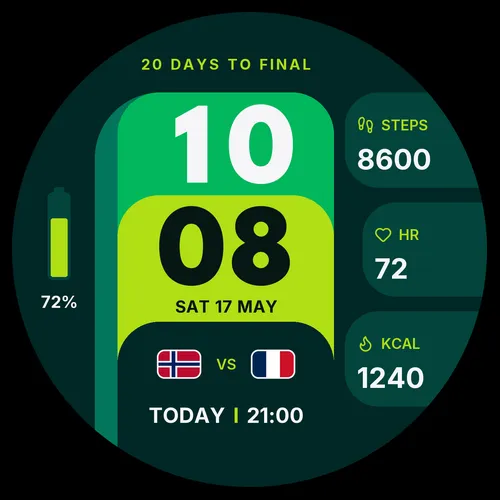
A tifo is the choreographed display a stand of supporters raises before kickoff, thousands of cards forming one picture. This face is that idea shrunk to a wrist: a bold, poster-like card in your team's colors that happens to also be a proper watch face. Time, date and your daily stats share the card with the one thing a fan actually wants to know: when the next match kicks off.
Matchday, handled
Tifo follows the tournament for you. The fixture card shows the next game automatically, with both team flags and the kickoff time, and switches to TODAY when it is match day. A countdown ticks off the days to the final, so you always know how close the big one is. Pick your nation from the 48 finalists and Tifo keeps their next game front and centre rather than the tournament's next kickoff.
The schedule maintains itself. As rounds resolve and new pairings appear, the face picks them up in the background over your phone connection, a few times a day, without a store update and without you doing anything.
Your day, on the same card
A large two-line clock and the date anchor the face. Three data panels take any of 20 stats: steps, heart rate, calories, distance, floors, stress, Body Battery, Pulse Ox, sunrise and sunset, altitude, pressure, temperature, notifications, VO2 Max, battery in days, week number, second time zone and more. A compact battery gauge keeps an eye on your charge.
Eight styles, one for every mood
Pitch, Canarinho, Sunset, Blaze, Royal, Frost, Coral and Noir. Each is a complete color treatment of the card, not just an accent swap. Switch any time, in the app or right on the watch.
Always-on display
A true always-on mode keeps the card visible dimmed, within Garmin's burn-in rules, so the matchday stays on your wrist without draining the battery.
Every setting, explained
Settings live in the Connect IQ app on your phone: your device, then Watch Faces, then Tifo, then Settings. Five entries, translated into 24 languages.
| Setting | Options | What it does |
|---|---|---|
| Colour style | Pitch / Canarinho / Sunset / Blaze / Royal / Frost / Coral / Noir | The card's full color treatment. |
| Favourite team | Any team / one of the 48 finalists | Keeps your nation's next fixture on the card. Any team shows the tournament's next kickoff instead. |
| Time format | Auto / 12h / 24h | Auto follows the watch system setting. |
| Panel 1, 2, 3 | 20 stats + Empty | What the three data panels show, top to bottom. |
On the watch vs on the phone
On watches with Garmin's on-device editor (Fenix 8, Venu 3 and other recent AMOLED models), hold the watch face and choose Customize to flip between the eight styles directly on the wrist. Team and panel choices are set in the Connect IQ app.
Works on
Tifo supports 41 AMOLED Garmin models:
| Family | Models |
|---|---|
| Fenix / Epix | Fenix 8 (43, 47), Fenix 8 Pro, Fenix E, Epix Gen 2 (42, 47, 51, Pro) |
| Forerunner | 165, 265 (and 265S), 570, 965, 970 |
| Venu / Vivoactive | Venu, Venu 2 (2S, 2 Plus), Venu 3 (3S), Venu 4 (41, 45), Vivoactive 5, 6 |
| Instinct | Instinct 3 AMOLED (45, 50), Instinct Crossover AMOLED |
| Specialty | MARQ Gen 2, Approach S50 and S70, Descent G2, Mk3, D2 Air X10, D2 Mach 1 and Mach 2 |
No MIP watches, on purpose. The design leans on deep blacks and saturated color that a 64-color MIP panel cannot honestly reproduce. If you wear a Fenix 7 or a Forerunner 955, look at Quipu, which we tuned for MIP properly.
The honest fine print
Fixture updates need your phone within Bluetooth reach every day or two; off the grid, the card keeps the last known schedule. Kickoff times display in your watch's local time. And Tifo is deliberately generic: team names appear as country names and flags, with no tournament or federation branding, which is what lets an independent studio make it.